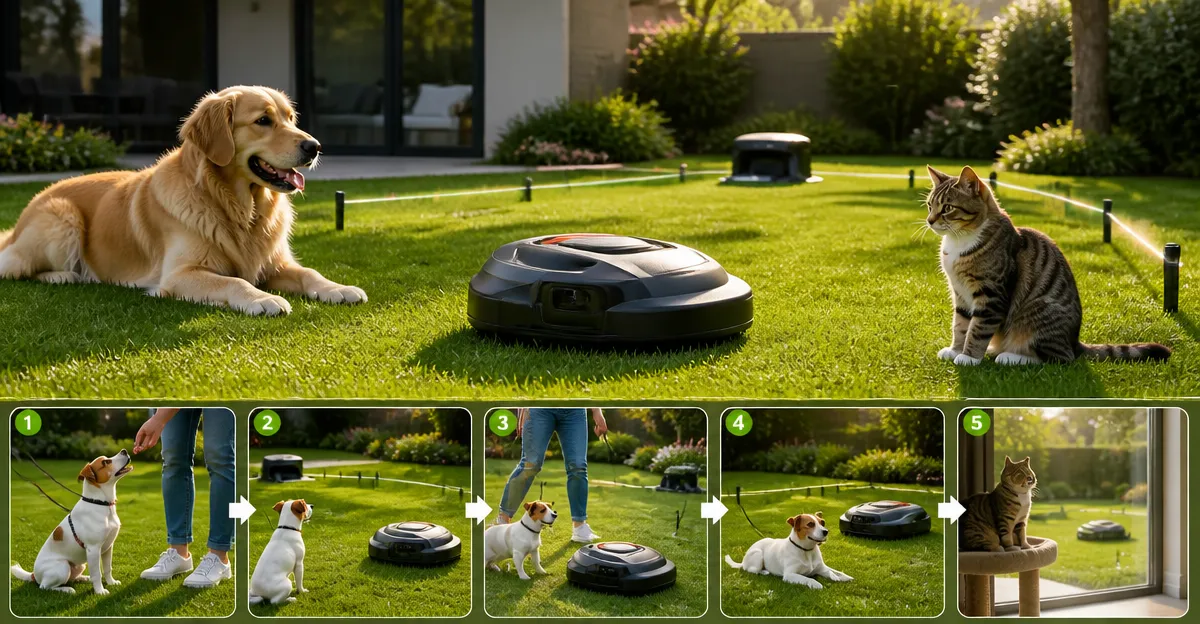
Introduction
This guide explains how a pet owner can safely introduce dogs and cats to a robotic lawn mower. Readers will learn practical steps that combine animal‑behavior techniques with the advanced capabilities of modern mowers. The information is valuable because unattended mowers can pose a risk of injury or stress to curious pets. By following the procedures, one can protect the animal, preserve the equipment, and enjoy a well‑maintained lawn.
What You’ll Need
- One wire‑free robotic mower (examples are provided in the product section)
- Leash or harness for initial supervised sessions
- Portable pet barrier or garden fence for temporary containment
- Smartphone with the mower’s companion app installed
- Optional safety accessories such as extra batteries or protective covers
Step 1: Assess the Yard and Choose the Right Mower
Before training begins, evaluate the size of the lawn, the presence of obstacles, and the typical weather conditions. A mower that offers precise navigation and obstacle avoidance reduces the likelihood of unexpected encounters with pets. For lawns up to one‑quarter acre, the WORX Wire‑Free Robot Lawn Mower provides centimeter‑level RTK Cloud accuracy, AI obstacle avoidance, and automatic edge cutting. It is priced at $999.99 and holds a rating of 4.7 out of 5 based on 20 reviews. The mower’s wheel brushes keep wheels clean, which minimizes slipping on grass where a pet might be standing.
Assess whether the yard contains shaded areas, slopes, or narrow passages. The WORX model uses V‑SLAM sensor fusion to maintain navigation even in deep shade, making it suitable for yards with trees or structures. If the property includes more complex terrain, the ECOVACS Goat O1000 RTK Mower offers LiDAR‑enhanced RTK navigation that maps the area in about five minutes. Priced at $699.00 with a 4.5 rating from 12 reviews, this mower excels at detecting obstacles such as swing sets and garden furniture.
Select a mower whose mapping capabilities align with the pet’s typical roaming zones. This initial assessment prevents the need for frequent re‑mapping later, which can cause stress for both the animal and the owner.
Step 2: Introduce the Pet to the Stationary Mower
Begin by placing the mower in its charging station and turning it off. Allow the dog or cat to approach the device while on a leash, observing its curiosity level. Reward calm behavior with treats and verbal praise. This step builds a positive association with the mower’s presence.
During this phase, the ECOVACS Goat O1000 RTK Mower can be useful because its app provides a live video feed of the mower’s location. The owner can monitor the animal’s distance from the device in real time, ensuring safety. The mower’s AIVI 3D obstacle avoidance system processes up to 10 trillion operations per second, which means it will pause automatically if a pet steps too close while the mower is powered on.
Do not allow the pet to chew on the mower’s charging cable or antenna. If the animal shows signs of anxiety, increase the distance between the pet and the mower and repeat the exposure gradually.
Step 3: Establish Safe Boundaries Using Virtual Zones
Most modern robotic mowers allow the creation of virtual boundaries through their companion apps. Use this feature to define a pet‑free zone around the house, garden beds, or any area where the animal frequently rests. The Segway Navimow i110N offers AI‑assisted mapping that automatically detects lawn edges and creates zones with a single tap. Priced at $788.00 and rated 4 out of 5 from 501 reviews, the Navimow’s EFLS 2.0 technology provides centimeter‑level positioning without a perimeter wire.
Within the app, draw a “no‑go” area that encompasses the pet’s favorite spot. The mower will respect this virtual fence, reducing the chance of accidental encounters. The Navimow also allows up to 12 zones, which is helpful for larger properties where pets may roam in multiple sections.
After setting the zones, run a short test mowing cycle while the pet is observed from a safe distance. Adjust the boundaries if the mower approaches too close to the animal’s location.
Step 4: Use Visual and Auditory Cues to Condition the Pet
Robotic mowers emit a low‑frequency hum and may display indicator lights. Pair these signals with a distinct command such as “stay” or “watch”. Consistency helps the animal learn that the sound indicates a machine that will operate independently.
If the pet is startled by the mower’s movement, consider attaching a reflective strip to the mower’s body. The ECOVACS Goat O1000 LiDAR Pro Mower includes a built‑in TruEdge trimmer that cuts close to borders, creating a clear visual line between the mowing path and the pet’s space. It is priced at $998.99 and carries a rating of 4 out of 5 from 116 reviews. The LiDAR system provides 2 cm positioning accuracy, which ensures the mower follows the programmed path precisely.
Play a short, pleasant tone from a smartphone each time the mower starts. Over time the pet will associate the tone with the mower’s safe operation and remain calm.
Step 5: Conduct Controlled Mowing Sessions
Schedule the mower to run when the pet is either inside the house or confined to a safe area. Use the app to set a specific start time, and enable the “remote pause” feature in case the animal approaches unexpectedly. All five mowers mentioned provide remote pause capabilities via their respective apps.
Begin with a brief mowing period of 10‑15 minutes. Observe the pet’s reaction from a distance and be prepared to pause the mower using the app if the animal shows curiosity. The WORX mower’s RadioLink connectivity ensures reliable communication even on larger lawns, reducing latency when issuing a pause command.
Gradually increase the mowing duration as the pet becomes accustomed to the machine’s presence. Document the pet’s behavior in a log to identify any patterns that may require additional training.
Step 6: Maintain Ongoing Supervision and Adjustments
Even after the pet appears comfortable, continue to supervise the mower for the first several weeks. Seasonal changes such as rain or temperature fluctuations can affect the mower’s sensor performance, which may alter its behavior near pets.
Regularly clean the mower’s sensors and wheel brushes. The WORX model’s wheel brush reduces grass buildup, which can otherwise cause the mower to slip and inadvertently move toward a pet. Cleaning the LiDAR dome on the ECOVACS LiDAR Pro every week maintains accurate obstacle detection.
Review the app’s mowing logs weekly to verify that the mower respected all virtual boundaries. Adjust zone settings if the pet’s habits change, such as a new sleeping spot or a relocated water bowl.
Tips & Pro Tips
- Place the RTK antenna on a pole at least six feet high and in an unobstructed location; this improves satellite reception and prevents the mower from drifting into pet zones.
- Use a pet‑friendly deterrent mat around the charging station if the animal tends to lie on it.
- Schedule mowing during cooler parts of the day to avoid heat stress for both the mower’s battery and the pet.
- Keep the mower’s firmware up to date; manufacturers frequently release improvements to obstacle‑avoidance algorithms.
Troubleshooting
| Problem | Possible Cause | Solution |
|---|---|---|
| Mower approaches pet despite virtual fence | Boundary not saved correctly or GPS signal weak | Re‑map the area, ensure RTK antenna has clear sky view, and verify zone settings in the app. |
| Pet becomes anxious when mower starts | Insufficient conditioning | Increase exposure time, use treats, and pair the mower’s hum with a calm command. |
| Mower stops unexpectedly | Obstacle detection triggered by pet movement | Pause the mower via the app, relocate the pet, and check sensor cleanliness. |
Conclusion
By assessing the lawn, selecting a mower with advanced navigation, establishing virtual pet‑free zones, and conditioning the animal with consistent cues, a homeowner can safely integrate a robotic mower into a pet‑friendly environment. Ongoing supervision, regular maintenance, and periodic adjustments ensure long‑term harmony between technology and companionship. Implementing the steps outlined in this guide will protect both the pet and the equipment while delivering a pristine, automatically‑maintained lawn.
Products Mentioned in This Guide
Frequently Asked Questions
How can I safely introduce my dog or cat to a robotic lawn mower?
Start with supervised, leashed sessions on a quiet lawn, gradually increasing exposure while the mower operates at low speed.
What equipment is essential for training pets around a robot mower?
A wire‑free mower, leash or harness, portable pet barrier or fence, and the mower’s smartphone app are the basics.
How does a robotic mower’s obstacle‑avoidance technology protect pets?
It uses sensors to detect and navigate around moving objects, reducing the chance of collisions with curious animals.
Should I use a leash or a barrier during the initial training?
Begin with a leash for direct control, then transition to a temporary barrier once the pet shows calm behavior around the mower.
Can I control the mower remotely while my pet is nearby?
Yes, the companion app lets you start, pause, or adjust the mower’s path, providing extra safety when pets are in the area.